
 EN
EN
We have all been there. You are halfway to work, stuck in traffic, and suddenly that nagging thought creeps in: "Did I remember to lock the front door?" In the era of traditional locks, the only answer was to turn around and drive back--or spend the entire day worrying. But with an app-connected smart lock, the answer is already in your pocket.
A quick glance at your phone confirms the door is locked. A tap on the screen, and you can lock or unlock it from anywhere in the world. You can send a temporary code to a visiting relative, check who came and went while you were out, and receive an instant alert if someone tries to tamper with the lock. This is not science fiction--it is the everyday reality of a connected smart lock. But how exactly does this "magic" work? What connects your phone to your door, and what should you know before choosing an app-enabled model? Let us break it down.
1. The Three Paths to Connectivity: WiFi, Bluetooth, and Gateway
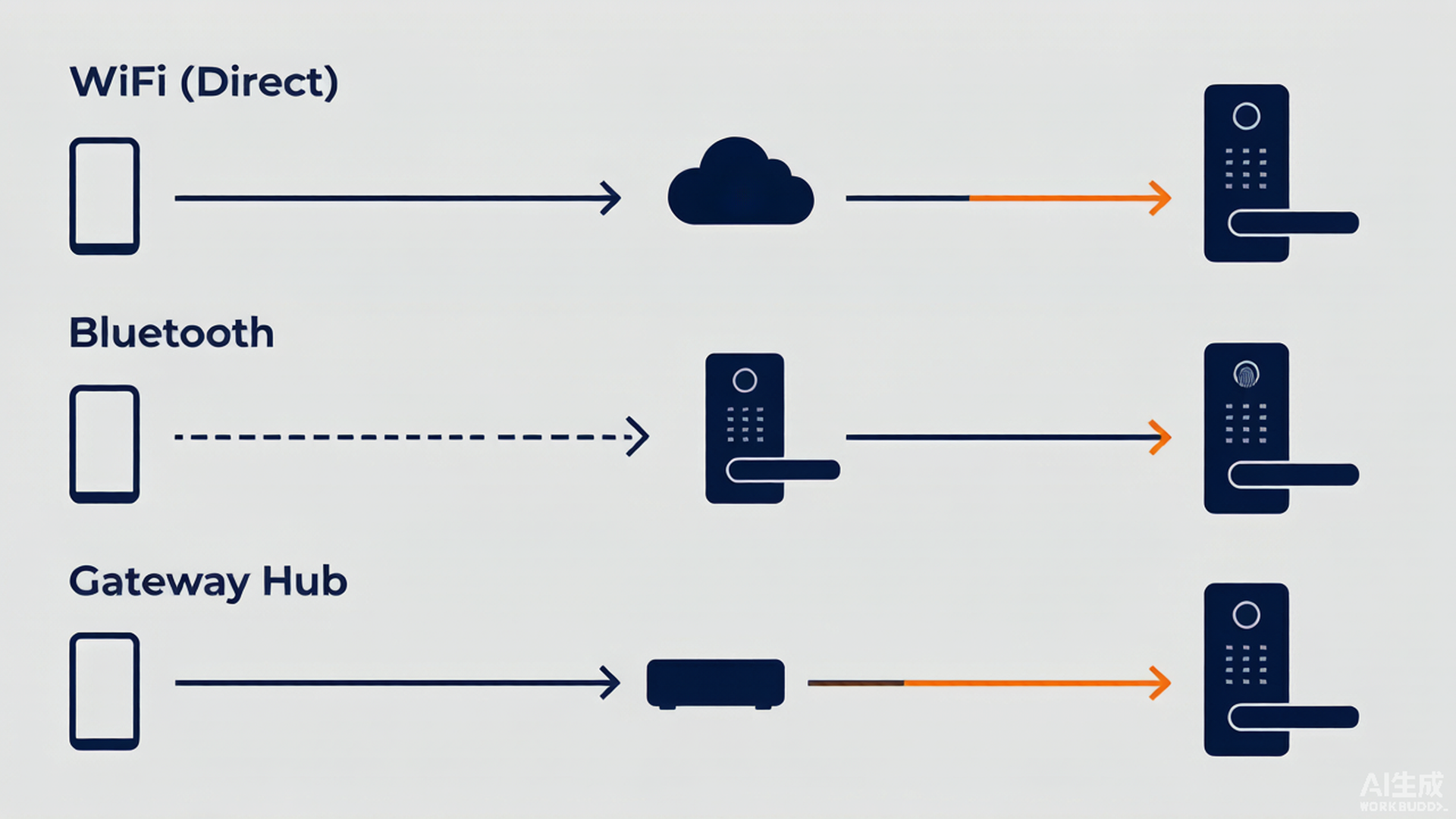
Before diving into features, it helps to understand how a smart lock actually talks to your phone. There are three main connectivity models on the market today, each with its own strengths:
Bluetooth (Direct Connection): This is the most independent option. Your phone communicates directly with the lock over Bluetooth when you are within range--typically 10 to 15 meters. No router, no internet, no gateway required. Bluetooth locks excel at fast, hands-free unlocking: your phone stays in your pocket, and the door unlocks the moment you approach. The trade-off? Once you walk away from the door, you lose the connection. You cannot check the lock status from the office, nor can you remotely unlock it for a delivery driver.
WiFi (Always-On Remote Access): Locks with built-in WiFi connect directly to your home router, just like a laptop or a smart speaker. This means true remote access: you can control the lock, view logs, and receive notifications from anywhere with an internet connection. The downside is higher power consumption--maintaining a constant WiFi connection drains batteries faster than Bluetooth-only models, so many WiFi locks use rechargeable lithium batteries instead of dry cells.
Gateway / Hub (Bridge Mode): Some locks do not have built-in WiFi but instead use a separate hub or gateway that plugs into your router. The lock talks to the gateway via Zigbee or Bluetooth, and the gateway relays commands to and from the cloud. This design extends battery life (since the lock only needs to communicate over short-range, low-power protocols) while still enabling full remote access. The catch is that you need to purchase and position the gateway near the lock, and the lock will not work remotely if the gateway loses power or internet.
2. Remote Control: What Can You Actually Do From Your Phone?
Once your lock is connected, the companion app becomes a remote control for your front door. The exact feature set varies by brand and model, but the most capable apps offer:
Remote Lock / Unlock: Tap a button in the app to lock or unlock your door from anywhere. Left for vacation and cannot remember if you locked up? One tap and you are done. Need to let a plumber in while you are at the office? Unlock remotely and lock again once they leave.
Real-Time Status Check: At any time, day or night, the app shows the current state of your door--locked, unlocked, or even "door left open." Some models also display the battery level, so you know exactly when to recharge or replace batteries before they run out.
Access History: Many connected locks maintain a detailed log of every unlock event--who, when, and by which method (fingerprint, passcode, app, key). Some apps even let you assign names to each user, so the log reads "Mom unlocked via fingerprint at 3:42 PM" instead of a meaningless code number.
3. Temporary Codes: Giving Access Without Giving Away Keys
This is arguably the most life-changing feature of a connected smart lock. Instead of making extra copies of physical keys--which can be lost, copied, or never returned--you can generate temporary passcodes directly from the app and share them with anyone, for any duration.
One-Time Codes for Service Personnel: Tell the app to create a 6-digit code valid only from 2:00 PM to 5:00 PM today. The cleaner arrives, enters the code, and gets in. After 5:00 PM, the code automatically expires and stops working. No need to chase anyone down for a key afterward.
Time-Limited Codes for Guests: Going away for a week? Generate a code that lasts for the entire duration of your trip and send it to a trusted neighbor or pet sitter. When you return, revoke it with one tap. The code appears in your access log, so you know exactly when it was used.
Recurring Codes for Rentals: Renting your property on Airbnb or similar platforms? Some smart lock apps integrate directly with booking platforms to auto-generate unique codes for each guest, synchronized with check-in and check-out times. Each guest gets their own code, and it expires automatically when their stay ends.
4. Real-Time Alerts: Your Door's Early Warning System
A connected smart lock does not just record what happened--it tells you what is happening, right now, through push notifications to your phone. The most useful alert types include:
Tamper / Forced Entry Alerts: If someone tries to pry open the lock, enters wrong codes repeatedly, or forcibly turns the handle, the lock sends an immediate alert to your phone. Some models also trigger a local alarm on the lock itself to scare off intruders.
Door-Left-Open Warnings: Left the door ajar? The lock detects that the door has not fully closed and notifies you after a set delay (e.g., 3 minutes). This prevents the classic "I thought I closed it" scenario from becoming a security risk.
Low-Battery Notifications: Even before the batteries die, the app warns you when power is running low--typically when about 20% of charge remains. This gives you days, not hours, to replace or recharge the batteries, eliminating the panic of being locked out due to a dead lock.
5. Smart Home Integration: Where Your Lock Fits in the Bigger Picture
A connected smart lock rarely works alone. The most popular models integrate with major smart home ecosystems, allowing you to build automated routines that link your lock to other devices:
Voice Control: Say "Good night" to your voice assistant, and the lock engages, the lights turn off, and the thermostat drops to sleeping temperature--all in one command.
Arrive-Home / Leave-Home Automation: When you unlock the door, the hallway lights turn on automatically, the air conditioner starts cooling, and your favorite playlist begins. When you lock up and leave, everything powers down to save energy.
Camera + Lock Linkage: If your smart doorbell or security camera detects motion at the door, you can view the camera feed and unlock the door for a trusted visitor--all from the same app.
6. Staying Connected Safely: Security Best Practices
Adding your front door to the internet naturally raises the question: is a connected lock safe? The answer is yes--provided you follow a few common-sense practices:
1. Protect Your Accounts: Your phone, your lock's app account, and your home WiFi router should all have strong, unique passwords. Enable two-factor authentication on the lock app whenever available. A connected lock is only as secure as the account that controls it.
2. Update Firmware Promptly: Keep the lock's firmware updated through the app. Manufacturers regularly release patches that close newly discovered vulnerabilities, just like smartphone or computer updates.
3. Keep the Mechanical Key: Even with full app connectivity, always keep your mechanical key accessible. If your home loses internet, your router dies, or the lock's battery is fully drained, the physical key is your ultimate backup. Technology is a convenience, not a replacement for the basics.
Conclusion: Your Door, Upgraded
A smart lock without app connectivity is like a smartphone without internet--it works, but you are missing the best part. Remote access, temporary codes, real-time alerts, and smart home integration transform a lock from a simple barrier into an active, intelligent guardian that keeps you informed and in control no matter where you are.
The next time you are miles from home and that familiar thought--"Did I lock the door?"--pops into your head, you will not need to turn around. You will simply reach for your phone, tap once, and know with certainty that your home is secure. That peace of mind, more than any single feature, is what makes a connected smart lock worth every penny.